
 VIERA Connect is the name of the Web platform that Panasonic uses in its networkable HDTVs, Blu-ray players, and HTiBs. I explored the 2012 version of VIERA Connect on both the TC-P55ST50 plasma and TC-L47DT50 LCD, both of which have built-in WiFi. VIERA Connect 2012 doesn't look that different from what we've seen in past years, in terms of the interface and premium services it offers; however, there are a few noteworthy changes. The main upgrade is that VIERA Connect now uses a cloud-based architecture, so you no longer have to download and store specific apps within the TV itself. That means no more memory limitations to cut down on the number of apps you can add. When you order a new app from the VIERA Connect Market, it loads very quickly. Top-shelf 2012 TV lines (like the VT50, GT50, and WT50 Series) include a dual-core processor that allows you to multitask. The ST50 and DT50 models I had in-house did not offer this feature, so I could not test it.
Additional Resources
• Read about Samsung's web platform, Smart Hub.
• Explore LED HDTVs and Plasma HDTVs in our review sections.
• Find more information in our Streaming, Apps, and Downloads News section.
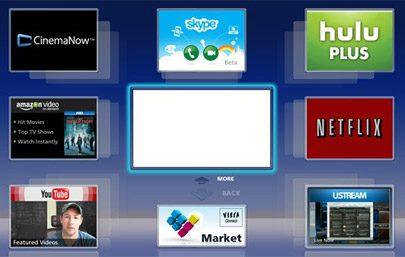
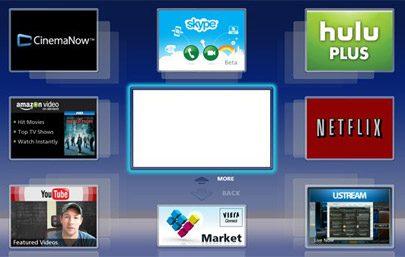
The VIERA Connect interface is a model of simplicity, a bit cleaner and less cluttered than some other Web platforms. When you launch VIERA Connect, your current video source continues to play in a decent-sized window in the center of the screen; around that window are seven apps (per page), a link to the VIERA Connect Market, and More/Back options to move through pages. You can reorganize and delete apps as desired through the Settings option. My only minor complaint about the interface is that it would be nice if you could move between pages simply by using the up/down controls on the remote, instead of having to specifically navigate to the More/Back buttons.
Premium apps include Netflix, Hulu Plus, Amazon Instant Video, CinemaNow, VUDU, YouTube, Skype, Social Networking TV, Pandora, and Rhapsody. The full sports suite is also available: MLB.TV, MLS, NHL, and NBA. The VIERA Connect Market is growing steadily and includes a nice assortment of news, entertainment, and gaming options; some services are free, while others cost a fee to purchase. Before you can add new apps, you must create a VIERA Connect account. I tried out a few of the free apps in the Kids section (Toon Goggles, Let's Play with Numbers, and Match the Animal) to see how they compared with the new Smart Interaction Kids apps from Samsung. The Panasonic apps were straightforward and easy to navigate, whereas the Samsung apps were somewhat slow and awkward to maneuver. My three-year-old enjoyed the games and still asks to play them (always a good sign). Just like Samsung, Panasonic offers some free fitness apps that allow you to attach a USB scale and track your fitness progress, but the Panasonic apps do not include the Virtual Mirror function that you get with top-shelf Samsung TVs that have integrated Web cameras. At CES 2012, Panasonic announced plans for a number of new apps, including Myspace TV, Disney interactive storybooks, HSN shopping, and entertainment apps from Miramax, Flixster, and SnagFilms. Myspace TV will combine live TV channels (with a focus on music at first) with social networking. As of mid-July, none of these new apps has been added. (I tested software version 1.190.)
VIERA Connect includes a Web browser that's generally easy to navigate, even with the standard-issue IR remote. You can also use the iOS/Android control app (see below for more details) or an add-on keyboard. Web pages load quickly, and you can zoom in/out easily using the remote's Blue/Green color buttons. I found Panasonic's Web browser to offer more intuitive navigation than the Samsung browser, but it's still not as simple as Web browsing through a laptop, tablet, or smartphone. While other manufacturers have added Flash support to their Web browsers, the Panasonic browser does not currently support Flash.
Although it's not officially part of VIERA Connect, DLNA media streaming is offered on Panasonic's smart HDTVs. The DLNA function worked fine with the PLEX media software installed on my MacBook Pro. Panasonic's DLNA interface is cleanly laid out, but the thumbnails it provides for photo/video content are way too small to be useful.
Panasonic provides only a basic IR remote with all but its top-shelf VT50 and WT50 models, which get the new VIERA Touch Pad Controller. (Panasonic doesn't offer the voice/motion control that you get with some Samsung/LG TVs.) The basic remote proved to be a fine means of controlling most of the VIERA Connect functions, but its lack of a full keyboard is a drawback. If you own an iOS/Android mobile device, you can download the free VIERA Remote app to control the TV over your home WiFi network. I tested the newest version of the app (v2.02) on both an iPhone and a Samsung Android-based tablet. The control app features a Pad Control directional slider, Cursor control for multi-directional Web navigation, and a game-pad layout for use with VIERA Connect games. Panasonic has added a Web browser directly within the app itself, so you can pull up a Web page directly on your mobile device and then "flick" it to the TV. (You can also bring Web pages from the TV to the mobile device.) Panasonic has also added a Media area where you can access the media stored on the mobile device and flick it to the TV. The Media function did not work when I first started using the control app, so I had to spend some time in Panasonic's Help area trying to get answers. With my iPhone, I originally got an error message when trying to access my media that read "The user has denied the application access to their media"; as it turns out, I had to enable Location Services for the VIERA Remote app in order to access my iPhone's media content. I also needed to properly configure the TV itself to receive the flicked media files. After that, the service worked fine on both the Android and iOS devices.
The virtual keyboard within the VIERA Remote app is the least intuitive that I've used to date. You have to jump through several hoops to enter and send the text, it lacks an Enter button, and the keyboard did not work within several apps, including Netflix, Amazon, and YouTube. Still, when the keyboard is available, it's a better, faster option than using the TV's onscreen text interface.
Read about the high points and low points of the VIERA Connect Platform on Page 2.
High Points
• The major video-on-demand bases are covered: Netflix, Amazon, Vudu, Hulu Plus, and CinemaNow.
• The VIERA Connect Market has a lot of games, sports, news, and other entertainment options.
• The interface is clean and simple.
• A Web browser and DLNA media streaming are available.
• The basic IR remote provides solid, reliable control, even for Web browsing.
• A control app is available for iOS/Android devices, and it includes a virtual keyboard, a touchpad slider, a game pad for Web games, and the ability to flick Web/media content to the TV.
• You can add a Web camera or keyboard.
Low Points
• The Web browser does not support Flash.
• None of the new Panasonic TVs includes a built-in Web camera for Skype and other services.
• In terms of device connectivity, Panasonic does not offer tools like WiFi Direct or a Soft AP mode.
• The VIERA Remote app does not always work reliably, especially the virtual keyboard.
• Panasonic has said it plans to introduce a better search function to provide a more thorough way to search all media types, but it is not yet available.
Conclusion
All in all, I'm a fan of the VIERA Connect platform. It offers access to all of the big-ticket Web services, and it does so through a simple, straightforward interface that has a quick response time. VIERA Connect doesn't yet offer some advanced features you can find with services from Samsung and LG, such as WiFi Direct connectivity for mobile devices, an integrated camera, advanced search capabilities, and Flash support for Web content. Still, the essentials are in place. My primary issues were not with the Web platform itself but with the accompanying VIERA Remote app, which does a good job controlling basic TV functions but is less intuitive when navigating the Web platform than other control apps I've used.
Additional Resources
• Read about Samsung's web platform, Smart Hub.
• Explore LED HDTVs and Plasma HDTVs in our review sections.
• Find more information in our Streaming, Apps, and Downloads News section.
